How to Create a Custom Transaction Detail Report in QuickBooks
by Laura Madeira | November 11, 2013 9:00 am
Another method used to verify you have recorded all your transactions requires a bit more effort on your part. Manually add the total of all deductions and additions from the statements your bank provides you and compare to the Custom Transaction Detail report.
To do so, follow these steps:
- From the menu bar, select Reports, Custom Reports, Transaction Detail. The Modify Report dialog box opens.
- Select the From and To dates to match the period you are reconciling. If it’s from the beginning of the file, you might want to leave the From date blank and enter only the To date.
- Click the Filters tab.
- In the Choose Filter box, with the Account filter highlighted, choose the bank account from the drop-down list.
- Click OK.
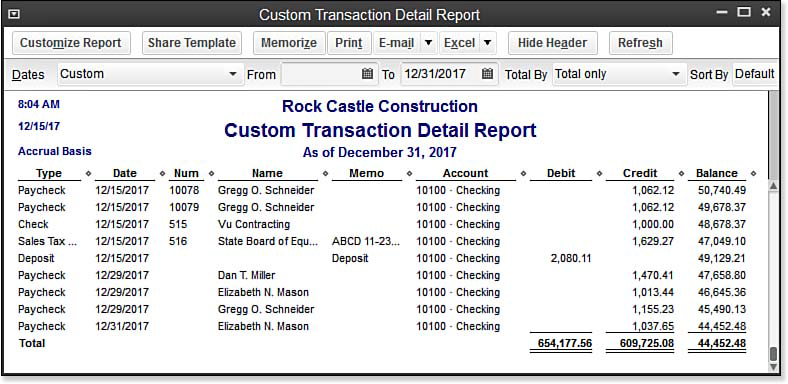
This report (see image below) totals all debits (money into your bank account) and credits (money out of your bank account). To these totals, you have to add in checks and deduct deposits that have not yet cleared the bank. If the resulting totals are exact, or close to your manual totals, you can feel confident reconciling multiple years, or months, at one time.
 [1]
[1]The modified Custom Transaction Detail Report shows the total of all money in and out of a bank account for the time period selected.
- [Image]: http://www.quick-training.com/wp-content/uploads/2013/11/13.23.bmp
- QuickBooks 2013 In Depth: http://www.quick-training.com/quickbooks-2013-in-depth/
Source URL: https://www.quick-training.info/2013/11/11/how-to-create-a-custom-transaction-detail-report-in-quickbooks/